문제점 : 수파베이스에서 데이터를 가져와서 카드 리스트를 뿌려줘야하는데 이미지가 절대 안보이는 이슈
import { createClient } from '@supabase/supabase-js';

// Supabase 클라이언트 초기화
const supabaseUrl = process.env.NEXT_PUBLIC_SUPABASE_URL as string;
const supabaseKey = process.env.NEXT_PUBLIC_SUPABASE_ANON_KEY as string;
const supabase = createClient(supabaseUrl, supabaseKey);

// posts 테이블에서 데이터 가져오는 함수
export interface PostType {
    address: string;
    category: string;
    completed: boolean;
    content: string;
    created_at: string;
    date: string;
    id: string;
    title: string;
    user_id: string;
    users : {nickname: string}
    images: {img_url: string}[]
}

export const getPosts = async (): Promise<PostType[]> => {
  const { data, error } = await supabase.from('posts').select(`*, users(nickname), images(img_url)`).order('created_at', { ascending: false });

  if (error) {
    console.error('Error fetching posts:', error);
    throw new Error('Failed to fetch posts');
  }

  console.log('data',data)
  return data as PostType[];
};
내가 필요한 데이터들을 posts, users, images 테이블에서 각각 뽑아오고,
'use client';

import React, { useEffect, useState } from 'react';
import CategoryBar from '@/components/home/CategoryBar';
import HeroSection from '@/components/home/HeroSection';
import SearchBar from '@/components/home/SearchBar';
import { getPosts } from '@/api/getPosts';
import VolunteerCard from './VolunteerCard';
import { PostType } from '@/api/getPosts';

export default function MainPage() {
  const [posts, setPosts] = useState<PostType[]>([]);
  const [loading, setLoading] = useState<boolean>(true);

  useEffect(() => {
    const fetchPosts = async () => {
      try {
        const fetchedPosts = await getPosts();
        // 최신 게시글 8개만 가져오기
        setPosts(fetchedPosts.slice(0, 8));
      } catch (error) {
        console.error('데이터를 불러오는데 실패했습니다.', error);
      } finally {
        setLoading(false);
      }
    };
    fetchPosts();
  }, []);

  if (loading) {
    return <div className="text-center py-5">Loading...</div>;
  }

  return (
    <section>
      <div className="flex justify-center items-center gap-3 mx-4">
        <CategoryBar />
        <SearchBar />
      </div>
      <div>
        <HeroSection />
      </div>
      <div className="py-4">
        <h2 className="px-5 text-xl font-semibold">방금 등록된 봉사</h2>
        <div className="grid grid-cols-1 sm:grid-cols-2 lg:grid-cols-4 gap-4 px-5 pb-20">
          {posts.map((post) => (
            <VolunteerCard key={post.id} post={post} />
          ))}
        </div>
      </div>
    </section>
  );
}
mainpage에서 데이터 가져올 함수를 가져와서 volunteercard에 prop으로 데이터를 넘겨줬다.
'use client';

import Image from 'next/image';
import React from 'react';
import { PostType } from '@/api/getPosts';

interface VolunteerCardProps {
  post: PostType;
}

const VolunteerCard = ({ post }: VolunteerCardProps) => {
  return (
    <div className="flex items-center pt-3">
      <div className="max-w-content border mx-auto rounded-lg">
        <div className="flex flex-col md:flex-row gap-12">
          <div className="p-5">
            <div className="flex items-center gap-2 mb-2">
              <span className="px-3 py-1 bg-gray-400 text-white text-xs rounded-full">{post.category}</span>
              <span className="px-3 py-1 bg-gray-400 text-white text-xs rounded-full">{post.date}</span>
            </div>
            <h3 className="text-lg font-semibold mb-1">{post.title}</h3>
            <div className="flex items-center text-sm text-gray-600">
              <span className="mr-4">{post.users.nickname}</span>
              <span>{post.created_at.split('T')[0]}</span>
            </div>
            <div className="md:w-1/2 flex flex-col items-center w-64 mt-6">
              {post.images?.img_url && (
                <Image
                  src={post.images?.img_url[0] || '/default-image.jpg'} // 기본 이미지 설정
                  alt={post.title}
                  width={800}
                  height={500}
                  className="object-cover"
                />
              )}
            </div>
          </div>
        </div>
      </div>
    </div>
  );
};

export default VolunteerCard;
그리고 실직적으로 데이터를 사용할 위치인 volunteercard에 데이터를 사용했는데 내가 생각했던 데이터 형태는 images 테이블 안에 img_url 데이터가 배열 형태로 들어가 있어서 가장 첫번째인 [0] 데이터를 받아오려고 로직을 저렇게 짰더니 사진은 안나오고

이런 모양의 에러만 뜸.
그래서 콘솔로 데이터를 찍어서 데이터가 들어오는 형태를 다시 확인해봤다.

이미지가 있는 데이터의 형태를 보니 내가 받아온 data가 각각의 배열로 이루어져 있고 그 안에 images 데이터는 배열의 형태고 그 안에 img_url이 객체 형태로 들어가 있는 구조였다.
그래서 내린 결론은 images 가 배열의 형태니까 map을 돌려서 그 안에 있는 이미지를 꺼내기로 했다.
'use client';

import Image from 'next/image';
import React from 'react';
// import oldman2 from '@/assets/oldman2.jpg';
import { PostType } from '@/api/getPosts';

interface VolunteerCardProps {
  post: PostType;
}

const VolunteerCard = ({ post }: VolunteerCardProps) => {
  console.log(post);
  return (
    <div className="flex items-center pt-3">
      <div className="max-w-content border mx-auto rounded-lg">
        <div className="flex flex-col md:flex-row gap-12">
          <div className="p-5">
            <div className="flex items-center gap-2 mb-2">
              <span className="px-3 py-1 bg-gray-400 text-white text-xs rounded-full">{post.category}</span>
              <span className="px-3 py-1 bg-gray-400 text-white text-xs rounded-full">{post.date}</span>
            </div>
            <h3 className="text-lg font-semibold mb-1">{post.title}</h3>
            <div className="flex items-center text-sm text-gray-600">
              <span className="mr-4">{post.users.nickname}</span>
              <span>{post.created_at.split('T')[0]}</span>
            </div>
            <div className="md:w-1/2 flex flex-col items-center w-64 mt-6">
              {post.images?.map((image, index) => (
                <Image
                  key={index}
                  src={image?.img_url}
                  alt={post.title}
                  width={800}
                  height={500}
                  className="object-cover"
                />
              ))}
            </div>
          </div>
        </div>
      </div>
    </div>
  );
};

export default VolunteerCard;
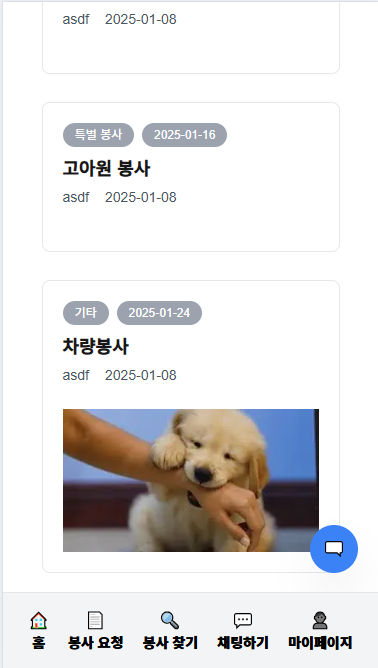
이런식으로 맵을 돌려서 데이터를 받아오니까 이미지가 있는 데이터의 경우 이미지가 매우 잘 불려짐!!!
느낀점 : 데이터 구조가 복잡할수록 더 꼼꼼히 데이터의 형태를 뜯어봐야겠다.